
Screenshots
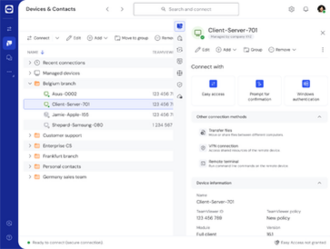
About TeamViewer
TeamViewer is a dependable remote-access tool for controlling another computer as if you were sitting in front of it. It is a lifesaver for helping family with tech trouble, reaching your office PC from home, or providing professional support.
Secure, encrypted connections, effortless file transfer and cross-platform reach make remote work and support simple, and it is free for personal use.
Key features
- ✓Remote control of any computer
- ✓Cross-platform and mobile support
- ✓Secure encrypted connections
- ✓Drag-and-drop file transfer
- ✓Unattended access to your devices
- ✓Free for personal use
Requirements
Windows 10 / 11, 64-bit
TeamViewer — frequently asked questions
Is TeamViewer free to download?+
TeamViewer is free to download, with optional paid features (freemium).
Is TeamViewer safe to download?+
Yes. HivApps links to the latest TeamViewer build and keeps listings clean, with no bundled extras. As always, keep your antivirus on and only install software you trust.
What is the latest version of TeamViewer?+
The latest version listed here is TeamViewer 15.54, updated Aug 19, 2026.
What do I need to run TeamViewer?+
Windows 10 / 11, 64-bit
How do I install TeamViewer on Windows?+
Click the Download button on this page, run the installer once it finishes downloading, and follow the on-screen setup steps.
Tags
Reviews
Write a review
Download TeamViewer for free
Latest version (15.54) · Safe & clean